
On the first of November, this post by Guille showed up in my timeline:
Remove your main @github account from your computer. Now.
Give your AI agent a separate GitHub account with minimal permissions per repo.
Let the agent create PRs, then use your main account to review and merge them.
Obvious advice, but essential in the age of AI agents.
I wasn’t following it, for my agents or for myself, but it made a lot of sense considering the current threat landscape. Attackers no longer need a way into production when the development flow is wide open: the packages we install, the tools we run, and the agents we hand our credentials to.
What changed, in short
vernaillenstill owns the repos. It sits behind a hardware key, and I only use it in the browser, to review and merge.wouter-vernaillen-devis now what every machine uses forgitandgh, whether I type the commands or an agent does. It can push branches and open pull requests. It cannot merge them.- A ruleset on every default branch requires one approval, and the account that pushed last cannot be the one approving.
- Machines hold no main-account credential. SSH keys,
ghtokens, and the Keychain all belong to the dev account. - A daily audit checks every repo. It tells me when a new repo still needs the collaborator and the ruleset, and how to add them.
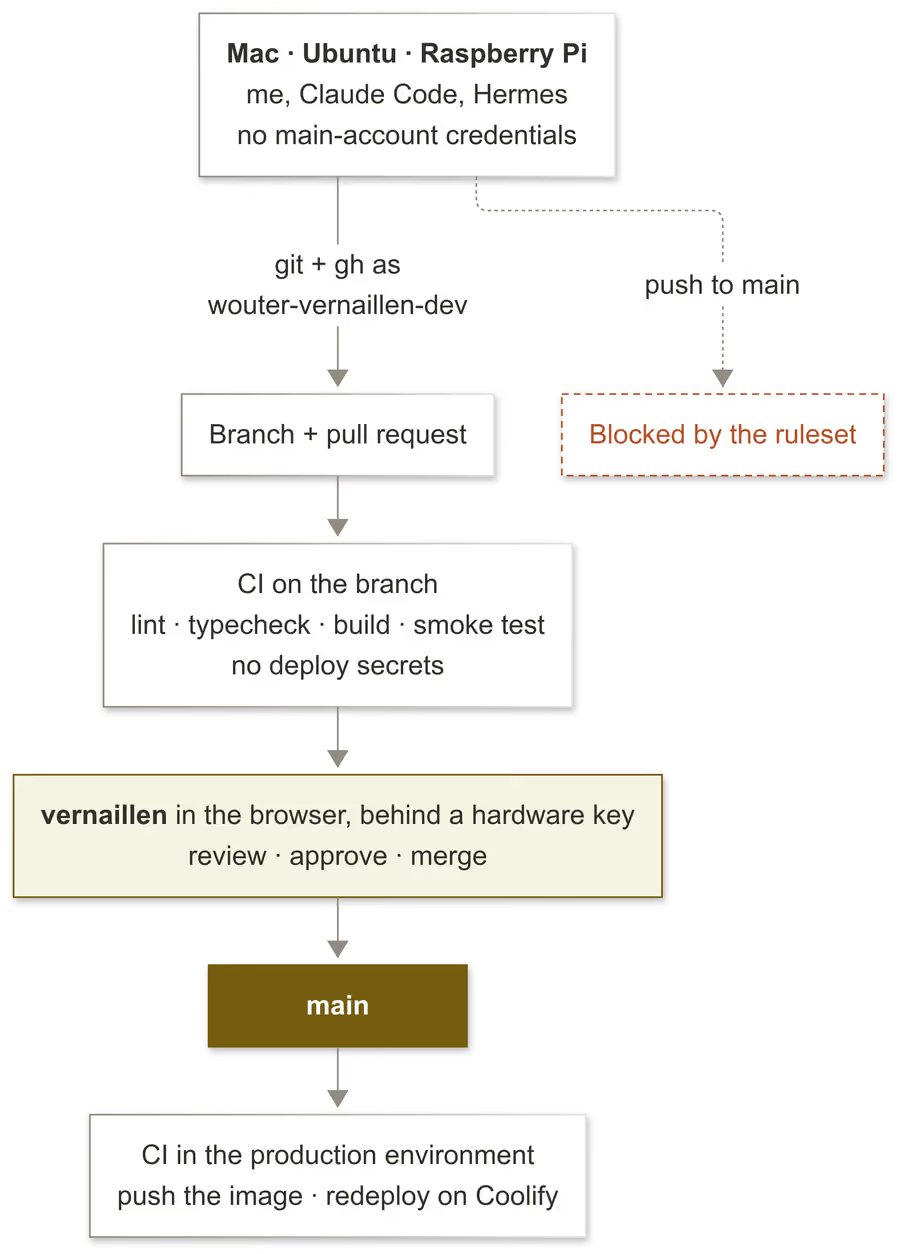
The worst a compromised machine or a confused agent can do now is read the repos, push a branch, and open a pull request. Nothing reaches main until I have had a chance to review it.
A lot of the code I push these days is written by an agent first. The rest I write in the same terminals. Claude Code runs on the Mac, Hermes runs unattended on an Ubuntu box, and a Raspberry Pi in the living room has its own repos. Until now all three used the main account’s credentials: the account that owns every repo, merges anything, pushes straight to main, changes settings, and deletes repositories.
A malicious postinstall script, a prompt injection, or a box I forgot to patch would find an SSH key and a gh token with that full control. Three machines, three ways in, each one giving away the keys to everything.
Two days later that was no longer true.
Git and gh now use the dev account
git points at the dev account through a plain github.com block in ~/.ssh/config. No host alias needed:
Host github.com
    Hostname github.com
    User git
    IdentityFile ~/.ssh/id_ed25519_github_dev
    IdentitiesOnly yes
IdentitiesOnly yes is the line that matters. Without it, SSH also offers every key in the agent, and GitHub picks the first one it recognises. That was the old key of the main account, so I kept authenticating as vernaillen after adding the new key.
ssh -T git@github.com shows who you are:
$ ssh -T git@github.com
Hi wouter-vernaillen-dev! You've successfully authenticated, but GitHub does not provide shell access.
gh gets the same treatment: gh auth login as the dev account, with SSH as the git protocol.
The ruleset, even for me
A repository ruleset protects the default branch. Rulesets can be created through the API, they target ~DEFAULT_BRANCH so main and master both match, and anyone with read access can read the rules. That last part makes the audit below possible.
Two rules do the real work:
- Admins bypass by pull request only. Repository admins (role id
5) may skip the approval, but only by merging a pull request.vernaillencan’t push straight tomaineither. Even for a quick fix, I open a pull request and merge it myself. That takes thirty seconds, and the change is on record. require_last_push_approvalmeans whoever pushed last cannot approve. An account cannot push onto someone else’s already-approved PR and have those new commits merged on the old approval.
{
  "name": "protect-main",
  "target": "branch",
  "enforcement": "active",
  "conditions": { "ref_name": { "include": ["~DEFAULT_BRANCH"], "exclude": [] } },
  "bypass_actors": [
    { "actor_type": "RepositoryRole", "actor_id": 5, "bypass_mode": "pull_request" }
  ],
  "rules": [
    { "type": "deletion" },
    { "type": "non_fast_forward" },
    {
      "type": "pull_request",
      "parameters": {
        "required_approving_review_count": 1,
        "require_last_push_approval": true,
        "dismiss_stale_reviews_on_push": true,
        "required_review_thread_resolution": true,
        "require_code_owner_review": false,
        "allowed_merge_methods": ["merge", "squash", "rebase"]
      }
    }
  ]
}
I tested it on this site first. The dev account opened a PR. GitHub refused the merge, in the CLI and in the browser. It could close and reopen the PR, nothing more. Then I merged it as vernaillen.
A daily audit instead of a script
I set up a new repo by hand, in the browser: add the dev account as a collaborator with write access, then import the ruleset JSON under Settings → Rules → Rulesets. A script would need an admin credential for the main account, which is exactly what this setup removes.
In case I forget to do that, my Daily Security Audit job in Hermes checks every repo each morning, using the dev account’s own read access. A missing ruleset, a weakened one, or an unaccepted invite shows up as a red line in the Telegram report, with the settings URL and the clicks to fix it:
ALERT     vernaillen/roon-tv (main): deletion not blocked, force-push not blocked, no approval required, last pusher can approve
  fix     https://github.com/vernaillen/roon-tv/settings/rules → New ruleset → Import a ruleset → ~/git/vernaillen/dotfiles/github/protect-main.json → Create
The audit only reports, it never changes anything. Its first run caught a repo I had created two days earlier.
What caught me
None of this was hard. Almost every step had a catch.
-
Rulesets on private repos cost money. On GitHub Free the rulesets API returns a 403 for private repos, and the plan that counts is the owner’s. So I upgraded
vernaillento Pro. A free organisation gets no rules on private repos at all; the audit lists those as skipped. -
Old credentials linger. After removing the main account’s SSH key I still found an OAuth token in the macOS Keychain (Cursor reuses VS Code’s GitHub sign-in),
ghon Ubuntu still logged in as the main account, and the Pi and Ubuntu SSH keys on the main account. Without the Keychain token, HTTPS remotes asked for a password until I switched them to SSH. -
GitHub credits a commit by its email, not by who pushed it. The Pi still had my old address as
user.email, so commits it pushed as the dev account would have shown up as made by the main account. -
Nobody hears about the PR unless you ask. A PR from the dev account notifies nobody, so every PR is opened with
gh pr create --reviewer vernaillen.
Keep the review loop short
Opening more pull requests only works if reviewing them costs little.
-
Automatically refuse edits on the default branch. The ruleset only rejects the push, when the commit already exists. A
PreToolUsehook onWriteandEditrefuses the edit itself on the default branch and tells the agent to branch first. It stopped Claude Code while it was adding this paragraph. -
The diff gets opened automatically when the code changed. Claude Code leaves its changes uncommitted. A
PostToolUsehook remembers which repos it touched, and aStophook runscursor .in each one that has uncommitted changes, so the diff is open before I’ve read the reply. Both hooks ship in a small private Claude Code plugin. Their blind spot: a change made through a shell command slips past both. -
Open PRs show up in my Harmonics Dashboard. The dashboard collects open pull requests across my repos, which allows me to review them all in one place.
-
prdoneafter a squash merge. Git never sees a squash-merged branch as merged, sogit branch -drefuses to delete it.prdone, a script from my dotfiles, switches back to the updated default branch and force-deletes the branch once GitHub confirms a merged PR contains its exact tip. It also sweeps older branches whose remote is gone:
#!/usr/bin/env bash
# After a squash merge: back to the updated default branch, merged local branches gone.
# -D is needed because squashed commits never look merged, so check GitHub first.

merged() {
  gh pr list --head "$1" --state merged --json headRefOid --jq '.[].headRefOid' </dev/null \
    | grep -qx "$(git rev-parse "refs/heads/$1")"
}

branch=$(git symbolic-ref --short HEAD 2>/dev/null) || { echo "prdone: not on a branch" >&2; exit 1; }
base=$(git symbolic-ref --short refs/remotes/origin/HEAD 2>/dev/null)
base=${base#origin/}
base=${base:-main}
if [[ "$branch" != "$base" ]]; then
  [[ -n "$(git status --porcelain)" ]] && { echo "prdone: uncommitted changes on $branch" >&2; exit 1; }
  merged "$branch" || { echo "prdone: no merged PR contains the tip of $branch" >&2; exit 1; }
  git switch "$base" && git branch -D "$branch" || exit 1
fi
git fetch --prune && git merge --ff-only "origin/$base" || exit 1
git for-each-ref --format='%(refname:short) %(upstream:track)' refs/heads | while read -r b track; do
  [[ "$track" == "[gone]" && "$b" != "$base" ]] || continue
  if git merge-base --is-ancestor "refs/heads/$b" "origin/$base" || merged "$b"; then
    git branch -D "$b"
  else
    echo "prdone: kept $b (remote gone, but its tip is not in $base and no merged PR contains it)" >&2
  fi
done
Deploy secrets only reach main
I only caught this while reviewing the post. CI runs on every push to every branch, and every job could read every repository secret, including the registry password and the token that tells Coolify to redeploy.
A branch runs its own copy of the workflow file. So the dev account, or anyone who steals its key, could push a branch that rewrites the workflow and sends those secrets anywhere, or pushes an image and redeploys it straight to production. The ruleset on main never comes into play.
The fix uses a GitHub Actions environment:
- A
productionenvironment, restricted to the default branch. Under Settings → Environments, its deployment branch policy allows onlymain. A job on any other branch that asks for it is refused. - The deploy secrets moved into that environment.
REGISTRY_USERNAME,REGISTRY_PASSWORDandCOOLIFY_TOKENare no longer repository secrets, so a job without the environment simply doesn’t get them. - Only the jobs that need them declare the environment. The job that pushes the image asks for
productiononmainonly, and the deploy job always asks for it, so on a branch it can’t run at all. - Everything else still runs on every branch. Lint, typecheck, the Docker build and the smoke test catch a broken change before it is merged. The secrets every build needs, like the read-only token for the GitHub data, stay repository secrets.
Rewriting the workflow on a branch no longer helps: the environment checks which branch the job runs on, not what the file says. And the only way onto main is a pull request I approved.
One gap remained, and I only found it while writing this section. Every app calls the pipeline from my shared workflows repo as @v1, and the dev account can push to that repo. The ruleset only covered branches, so it could have moved the v1 tag to a rewritten workflow. The next run on main in every app would then have run that code, with the production secrets. A tag ruleset on that repo now blocks creating, moving or deleting v* tags for everyone but me, and the daily audit checks that it stays there.
What the replies added
The replies under Guille’s post are worth reading. Next to the usual “I just give it full permissions”, three points stood out.
-
The ruleset is what makes it hold. One reply put it well: without a server-side rule that requires an approval and dismisses it when new commits land, the agent account can still push after you approve, or merge if it has write access. A separate account on its own is a habit. The ruleset is the guarantee. That is what
dismiss_stale_reviews_on_pushandrequire_last_push_approvalare for. -
A machine account is allowed. GitHub’s Terms of Service allow one free personal account per person, plus a machine account, as long as that account is only used for automation.
-
A token or a GitHub App can do the same job. A fine-grained personal access token scoped to a few repos limits what that token can do. A GitHub App gives short-lived tokens with a bot identity, which fits when agents need different permissions: a reviewer that may merge, a coding agent that may only open PRs.
I went with an account because it covers plaingitover SSH on every machine with one key, shows up as a separate author on every PR, and needs no token rotation. Whichever you pick, the ruleset onmainis the part that does the real work.
Was it worth it?
Definitely!
The switch took less than a day, most of it on the catches above. Day to day, almost nothing changed. Agents and I still branch, push, and open pull requests, and I still merge in the browser.
A confused agent or a compromised machine now fails when it tries to push to main or deploy to production.
The first time it mattered, it was me. I committed a dotfiles change straight to main, out of habit. GitHub said no. I moved the commit to a branch, opened a PR, and merged it.
Edit: my main account gets the credit again
Added on November 9, 2026.
A day after publishing, I looked at my main account’s profile. The contribution graph was almost empty. Every commit carried the dev account’s address, so GitHub credited all of them to the dev account, and my main account only got the merge commits from the browser.
That is the email catch from above, the other way round. GitHub credits a commit by the email in it, not by the account that pushes it. And that email grants nothing: git writes it locally, GitHub doesn’t check it, and it plays no part in what an account may push or merge.
So I set user.email on all three machines to my main account’s noreply address:
git config --global user.email 102268+vernaillen@users.noreply.github.comThe dev account still pushes every branch and opens every PR, and the ruleset on main still only lets in what I approved. The commits just count for my main account again, and the noreply address keeps my real email out of public history.